Trying the Basics of Foundation Models
This article is translated from my original Japanese article: WWDC 2026の前にFoundation Modelsの基本を試してみる.
WWDC 2026 is just around the corner.
Writing about something from WWDC 2025 at this point does feel a bit late.
That said, I’m half expecting and half hoping that Apple Intelligence will get some updates at this year’s WWDC. It felt a bit strange to watch the next announcement without properly trying what was announced last year, so I started by playing with the Foundation Models framework.
This article is based on WWDC25’s Meet the Foundation Models framework.
I’ll summarize the basics I tried, and the things I noticed when thinking about how I would use Foundation Models in an iOS app.
What are Foundation Models?
Foundation Models is a framework for accessing the on-device LLM that powers Apple Intelligence.
Roughly speaking, it lets us call the on-device language model behind Apple Intelligence directly from Swift. Instead of sending a request to a cloud LLM API, we can perform generation, summarization, classification, structured output, and tool calling on the user’s device.
Apple’s official documentation lists tasks such as:
- Summarization
- Entity extraction
- Text understanding
- Text refinement
- Short game dialogue generation
- Creative text generation
- And more
The WWDC session this article is based on
This article is based on Meet the Foundation Models framework. It was a good starting point for getting the overall picture of Foundation Models.
There are a few other Foundation Models-related sessions as well. These seem to go deeper into implementation details. I haven’t watched these three yet, so I’ll go through them separately.
| Session | What to look for |
|---|---|
| Code-along: Bring on-device AI to your app using the Foundation Models framework | Integrating it into a SwiftUI app, prompt engineering, tool calling, streaming, profiling |
| Explore prompt design & safety for on-device foundation models | Prompt design for on-device LLMs, safety, evaluation, testing |
| Deep dive into the Foundation Models framework | Sessions, @Generable, dynamic schema, tool calling details |
Try it in Xcode before wiring it into the app
When using Foundation Models, we need to try different prompts and see what works. With the #Playground macro, we can send a prompt to the on-device model with just a few lines of code. For example, if we ask “Where should I go sightseeing in Tokyo?”, the model’s output appears in the canvas on the right.
We can also access types defined in the app.
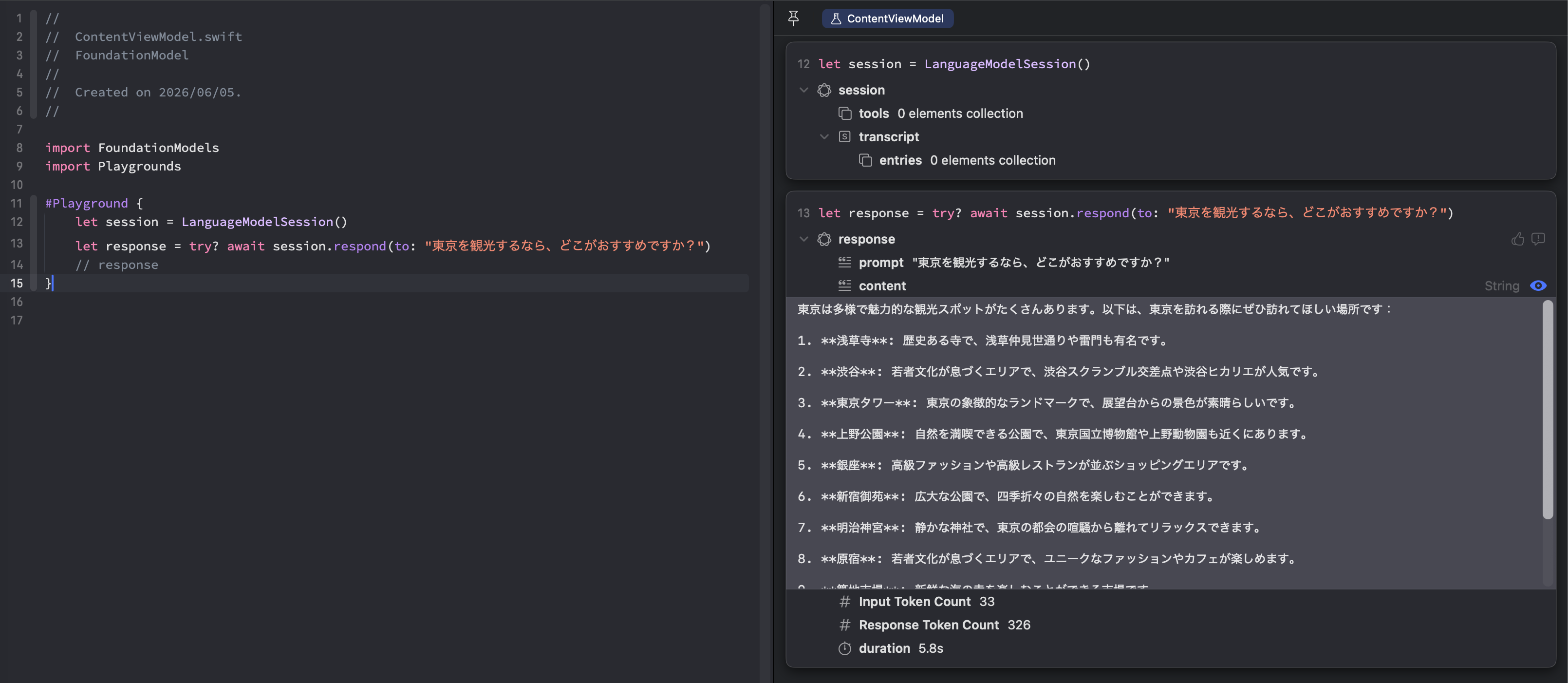
Basic usage
First, check whether the model is available before calling it. Then create a LanguageModelSession, and use guided generation if needed.
Check availability
Before using Foundation Models, first check availability.
Foundation Models depends on Apple Intelligence, so it may not be available in every environment. For example:
- The device does not support Apple Intelligence
- Apple Intelligence is disabled in Settings
- The model is still downloading, or temporarily not ready
- The current language or locale is not supported
We can check SystemLanguageModel.default.availability to determine whether the model is available in the current environment.
import FoundationModels
import SwiftUI

struct AvailabilityCheckView: View {
    private let model = SystemLanguageModel.default

    var body: some View {
        switch model.availability {
        case .available:
            AvailableView()
        case .unavailable(.deviceNotEligible):
            CorruptView()
        case .unavailable(.appleIntelligenceNotEnabled):
            CorruptView()
        case .unavailable(.modelNotReady):
            CorruptView()
        case .unavailable(_):
            CorruptView()
        }
    }
}
Call it with LanguageModelSession
The basic flow is to create a LanguageModelSession and pass a prompt with respond(to:).
import FoundationModels
import Playgrounds
#Playground {
    let session = LanguageModelSession()
    let response = try await session.respond(to: "Where should I go sightseeing in Tokyo?")
    print(response.content)
}
Guided generation
As we can see from the previous screenshot, the response from respond(to:) comes back as plain text. That is a little awkward if we want to reuse the output inside the app.
This is where Foundation Models’ guided generation is useful. It lets us move this part closer to Swift type definitions.
With @Generable, we can receive the model output as a Swift type. For example, if we want the model to suggest sightseeing spots in Tokyo, we can define a type like this:
import FoundationModels

@Generable
struct SpotSuggestions {
    @Guide(description: "Recommended spots for a trip to Tokyo", .count(5))
    var locations: [String]
}
The caller no longer needs to parse a String as JSON.
#Playground {
    let prompt = "Where should I go sightseeing in Tokyo?"
    let session = LanguageModelSession()
    let response = try? await session.respond(to: prompt, generating: SpotSuggestions.self)
    let suggestion = response?.content
}
@Generable types can use primitive types, arrays, and other Generable types. For example:
@Generable
struct SpotSuggestions {
    @Guide(description: "Recommended spots for a trip to Tokyo", .count(3))
    var locations: [Spot]
}

@Generable
struct Spot {
    @Guide(description: "Name of the recommended spot")
    var name: String
    @Guide(description: "A short description of the recommended spot")
    var description: String
    @Guide(description: "Why this spot is recommended")
    var reason: String
}
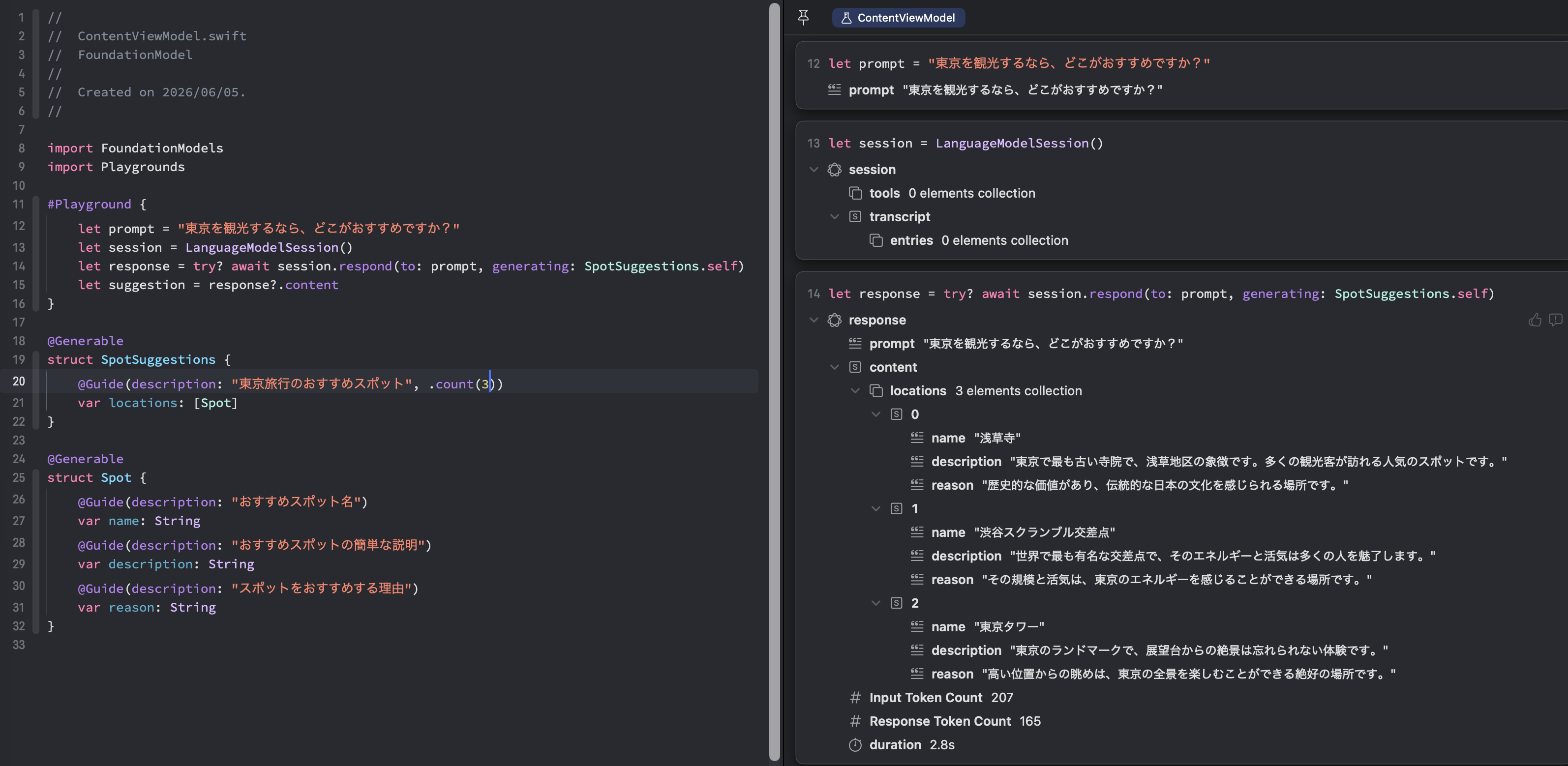
Guided generation gives us some control over the structure of the output. Instead of describing the JSON shape in detail inside the prompt, we can express the expected shape as a Swift type. In the session, Apple also explained that specifying structure can have a positive effect on inference speed and accuracy.
View intermediate state with streamResponse
respond(to:) returns only after generation has finished. That is fine for short outputs, but if the response gets longer or generation takes some time, we may want to show the intermediate state.
In that case, use session.streamResponse.
With streamResponse, we can receive snapshots while generation is still in progress, instead of waiting for the final result. This lets us update the UI little by little based on the current state, which can feel more natural than waiting for the final output. The idea is less about manually stitching together token-level deltas, and more about seeing the content the model has produced so far as a snapshot.
For example:
var session: LanguageModelSession = LanguageModelSession()
private let prompt = "Where should I go sightseeing in Tokyo?"
private(set) var streamingLines: [String] = []

func suggestSpotStream() async {
    // start streaming; handle errors from caller or log locally
    let stream = session.streamResponse(to: prompt, generating: SpotSuggestions.self)
    do {
        for try await snapshot in stream {
            let description = String(describing: snapshot.content)
            streamingLines.append(description)
        }
    } catch {
       print("Error:", error)
    }
}
I’ll try Tool calling in a separate article
Foundation Models also supports tool calling.
Tool calling lets the model call app-defined behavior when needed. For example, instead of putting all the information into the prompt, the model can call an app-side tool at the right time and retrieve data from a local database or other app data.
The important point is that the model does not get to “do anything directly.” The app defines which operations are available as tools. The model decides which tool to use, and the Foundation Models framework invokes the tool code defined by the app.
The result of the tool call is added to the session transcript, and the model uses that result when generating the final response. This makes it easier to use app-specific data, or trusted information sources such as MapKit, instead of relying only on what we can fit into a prompt. That said, tool design, argument definitions, and deciding how much to delegate to the model all need some thought.
I won’t go deeper into tool calling in this article. I’ll try a concrete example in a separate one.
References
WWDC sessions
- Meet the Foundation Models framework - WWDC25 - Videos - Apple Developer
- Code-along: Bring on-device AI to your app using the Foundation Models framework - WWDC25 - Videos - Apple Developer
- Explore prompt design & safety for on-device foundation models - WWDC25 - Videos - Apple Developer
- Deep dive into the Foundation Models framework - WWDC25 - Videos - Apple Developer
API documentation
- Foundation Models | Apple Developer Documentation
- SystemLanguageModel | Apple Developer Documentation
- LanguageModelSession | Apple Developer Documentation
Tutorials
- Generating Swift data structures with guided generation | Apple Developer Documentation
- Expanding generation with tool calling | Apple Developer Documentation
- Generating content and performing tasks with Foundation Models | Apple Developer Documentation